Multi-Office Network Setup for Canadian SMBs Opening a Second or Third Location
April 2, 2026

Opening a second office breaks every assumption a single-office network runs on. This playbook covers the real decisions Canadian SMBs face: fibre timelines, SD-WAN trade-offs, per-site security, and why the third office is an organizational pivot, not just a technical one.

The second office forces decisions that never came up at the first location. Routing, authentication, shared file access, centralized security, Wi-Fi coverage at a new site. A single-office network usually runs on one internet connection, one firewall, and one flat Wi-Fi configuration. Opening a second location breaks every one of those assumptions.
This playbook walks Canadian COOs, operations leaders, and founders through the real decisions behind a multi-office network setup. Circuit procurement timelines, connectivity model trade-offs, architecture choices, security and Wi-Fi design, realistic deployment timelines, and the build-versus-manage question. No marketing language. Just the questions you need to answer before signing the second lease, and the costs you need to plan for.
The Second Office Is an Inflection Point, Not a Scaling Step
Most single-office Canadian SMBs operate a flat network with one internet circuit, one firewall, and one Wi-Fi configuration that covers the whole space. Everything authenticates locally. Everything routes through the same gateway. A second office forces every one of those assumptions open.
Clear signs a company has outgrown its current network:
- Remote workers at the second location tunnel back through VPN to reach shared files at the head office
- Printing is inconsistent across sites or fails entirely after network changes
- Teams at the newer location report slow application performance, especially with cloud software
- The head office firewall handles all traffic from both sites, creating a bottleneck
- IT staff cannot tell which site is causing a problem because there is no per-site visibility
The cost gap catches finance leaders off guard. A single-office setup usually runs under $15,000 CAD for core network equipment. A proper multi-office setup lands between $40,000 and $80,000 CAD for two locations, depending on circuit complexity and hardware choices. Most of the delta sits in circuit provisioning, per-site firewall hardware, and design and project labour. Ongoing monthly costs also rise, since each site needs its own internet circuit and potentially its own SD-WAN subscription.
Circuit Procurement Realities in Canada
Circuit procurement drives the timeline of every multi-office project. Canadian business fibre lead times vary by carrier and address. National carriers typically quote 30 to 45 days for serviceable addresses in major urban markets. Greenfield buildings or multi-tenant office towers can push that to 90 to 120 days. Regional carriers often move faster inside their footprints but may not reach every address. The CRTC's 2024 wholesale fibre access policy expanded the pool of providers that can deliver service to business addresses. Pricing competition has improved in some markets. Installation timelines for new builds have not meaningfully shortened.
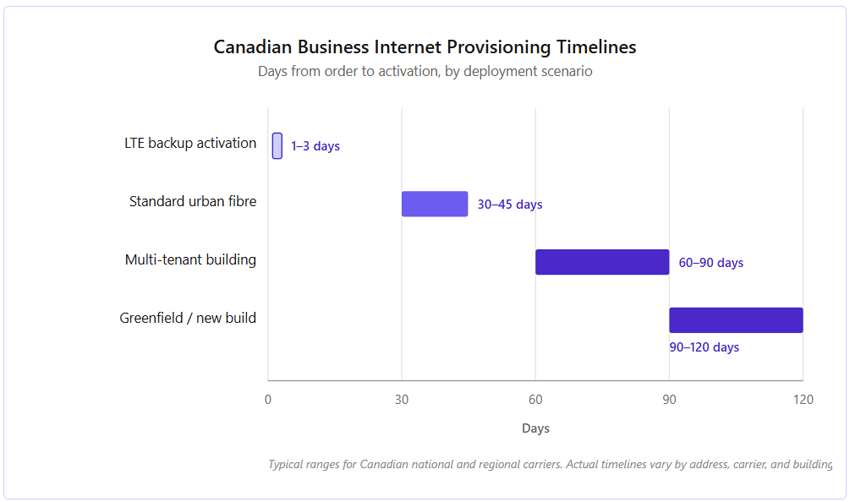
Serviceability checks should happen before the lease gets signed. Canadian SMBs have committed to leases only to discover the building has no fibre. The fallback options are expensive. LTE-based business internet runs 2 to 4 times the monthly cost of fibre and caps at lower speeds. A temporary bonded copper circuit adds hardware costs and still performs poorly for cloud applications. Asking the landlord for a fibre install is possible but adds weeks or months to the timeline.
Redundancy at a branch office usually means a primary fibre circuit with LTE failover. Dual-fibre from different carriers is rarely justified below 50 users unless the office runs revenue-generating workloads like a contact centre or e-commerce operation. LTE failover adds $80 to $150 CAD per month and covers most typical outages without the cost of a second fibre installation.
Site-to-Site VPN, SD-WAN, or Hybrid?
The connectivity model is the biggest architectural decision in a multi-office network setup. Three options dominate the Canadian SMB market.
When Site-to-Site VPN Is Enough
Site-to-site VPN works well for two or three offices with predictable traffic patterns. It runs on existing firewall hardware and adds no subscription cost. The configuration is well understood, and any competent network engineer can deploy it. The trade-off is real. VPN tunnels have no application-aware routing. They cannot prioritize cloud calls over file transfers. Visibility into what is slow and why remains limited unless you layer monitoring tools on top.
When SD-WAN Earns Its Cost
SD-WAN becomes economically justified at the second or third office when the company runs cloud applications heavily. Microsoft 365, Salesforce, cloud ERP platforms, video conferencing. SD-WAN adds roughly $150 to $400 CAD per site per month but typically eliminates MPLS costs and improves SaaS performance through application-aware routing. Gartner's forecast projects 70 percent of enterprises will have implemented SD-WAN by the end of 2026, up from around 45 percent in 2021. The shift reflects how cloud-heavy workloads have become for mid-market businesses.
The Hybrid Model Most Canadian SMBs End Up With
Hybrid models give many Canadian SMBs the best cost-to-performance ratio at two or three offices. Internal traffic (file shares, authentication, legacy applications) uses site-to-site tunnels between firewalls. SaaS traffic breaks out directly to the internet at each site, avoiding the hairpin through the head office. This model costs less than full SD-WAN and performs better than pure VPN.
Architecture and Identity Across Sites
Active Directory Sites and Services becomes relevant the moment a second office opens. Without proper site definition, authentication traffic routes inefficiently. Users at the second location end up authenticating to a domain controller at the head office, which slows login and file access. Defining each location as a site in Active Directory tells Windows to prefer local domain controllers. Most mid-market Canadian SMBs still run at least some on-premises Active Directory, even when cloud email and productivity are in place.
Companies running cloud productivity suites have an easier path because authentication happens in the cloud. Users log in to their laptops through cloud identity services, and the session follows them to any office with internet access. On-premises resources still need local authentication, which complicates hybrid scenarios. A proper design decides which systems authenticate where and builds trust relationships accordingly.
Cloud-managed networking platforms dominate the multi-office SMB segment because a single dashboard replaces per-site management. Configuration changes push to all sites from one interface. Firmware updates, VLAN changes, and security policy updates happen once, not per site. The subscription cost usually pays for itself in reduced IT labour within a year, especially for companies running more than two locations or relying on external IT support for changes.
Security, Wi-Fi, and User Experience at the Branch
Every office needs its own firewall. Routing all traffic through the head office firewall creates a bottleneck and a single point of failure. If the head office circuit goes down, the branch office loses internet entirely. If the head office firewall is overloaded, every user at the branch feels it. Modern SMB firewalls offer centralized management that makes per-site deployment manageable. Statistics Canada's 2025 Canadian Survey of Cyber Security and Cybercrime shows that Canadian businesses face rising cyberattack exposure. Per-site security controls are a practical requirement, not an over-engineered luxury.
Wi-Fi design at a second office often gets underestimated. A 3,000 square foot office with 20 staff typically needs two to three access points, not one. Wi-Fi Alliance guidance on 6E deployment density recommends 1,500 to 2,000 square feet per access point for modern enterprise WLAN designs. Coverage planning should account for conference rooms, kitchens, elevators, and the guest Wi-Fi footprint.
Guest Wi-Fi and employee Wi-Fi should always run on separate VLANs. Canadian privacy obligations under the Office of the Privacy Commissioner's meaningful consent guidelines make this non-negotiable. The rule applies whenever guest users provide any personal information at sign-in, including email capture for portal access. Proper VLAN segregation, a captive portal with clear consent language, and limited data retention together form the foundation of compliant guest network design.
Why the Third Office Is Not Just Another Second Office
At three offices, hub-and-spoke topology starts breaking down. When every branch routes through the head office to reach another branch, traffic patterns become inefficient. A video call from Toronto to Calgary that hairpins through Vancouver wastes bandwidth and adds latency. Mesh or full-mesh SD-WAN overlays become worth the complexity at this stage. Each site connects directly to every other site through optimized paths, and the head office stops being a routing bottleneck.
The third office is usually where a company's internal IT capacity saturates. One or two IT staff can manage a single office. Most can stretch to a second location. Three sites strain the limits of a small team, especially when different sites have different vendors, different Wi-Fi systems, or different firewall models. Most Canadian SMBs that reach three offices take one of two paths. Some hire dedicated network staff. Others move to a co-managed MSP arrangement where the MSP handles architecture and project work and the internal team handles daily operations.
Standardization becomes the biggest lever at three offices. If each site runs different firewall vendors, switch models, or Wi-Fi systems, troubleshooting costs and downtime compound with every future expansion. A standard hardware stack across all sites means spare inventory, common configurations, and predictable failure modes. Expansion to a fourth or fifth office becomes a rollout exercise instead of a redesign exercise.
Realistic Deployment Timeline
A second-office deployment in Canada takes 8 to 14 weeks from decision to go-live. Circuit provisioning drives the timeline. Everything else (hardware procurement, configuration, cabling, testing) compresses into the final three to four weeks. Companies that try to compress the total project under eight weeks almost always sacrifice testing, which surfaces as stability problems during the first month of operation.
The biggest timeline risks are worth naming explicitly:
- Address serviceability discovered late, forcing a carrier change or a temporary LTE fallback
- Building access restrictions for cabling contractors, especially in commercial towers with after-hours-only policies
- Lease-specified IT rooms that require electrical or HVAC upgrades before equipment can be installed
- Hardware supply delays, which have improved since 2023 but still hit enterprise firewall and switch inventory
- Internal team availability, particularly for user acceptance testing at the new site
Parallel workstreams help compress the timeline without cutting quality. Circuit ordering happens in week 1. Hardware procurement starts in week 2 and continues through week 3. Cabling and physical infrastructure work runs weeks 4 through 8, often overlapping with general construction or tenant fit-out. Configuration and testing happen in weeks 8 through 12, largely in parallel with cabling completion. Cutover and user acceptance take the final two weeks.
Internal IT, Co-Managed, or Fully Managed
Internal IT teams of one or two people rarely have the bandwidth to design and deploy a multi-office network without external help. The design phase alone takes 40 to 80 hours of architect time. The cutover takes full-attention work across a weekend. Ongoing management can be handled internally if the team has the right skill set, but the initial design and cutover usually need project-based expertise.
Co-managed engagements work well when the internal IT team wants operational control but needs architecture, project delivery, and after-hours support from an MSP. The MSP handles the design, the procurement, the cutover, and the 24/7 monitoring. The internal team handles user support, minor configuration changes, and vendor relationships. This model works particularly well at the two-to-three office stage where internal IT is capable but stretched.
Fully managed network services make sense when the company wants predictable monthly costs, 24/7 monitoring, and a single vendor accountable for uptime across all sites. Design, deployment, monitoring, and support all sit with one provider. For Canadian SMBs opening their second or third office, this model removes the burden of becoming network experts and replaces it with a contractual service level. MCK's managed network services for Canadian SMBs cover the full engagement from site survey through ongoing management.
A Second Office Is a Design Decision, Not a Hardware Purchase
The decisions that look technical are organizational. The decisions that feel urgent are slow. The decisions that seem like one-time spending become the foundation for every office that follows.
Circuit timeline drives the calendar. Cloud application load drives the connectivity model. Internal IT capacity drives whether the third office works or breaks.
Most Canadian SMBs that struggle at the third office made their mistakes at the second. They bought hardware before designing the architecture. They signed the lease before confirming serviceability. They called an MSP after cutover instead of before the site survey.
Hardware still matters. It is no longer the first question. A multi-office network that scales is designed during planning, not built during deployment.
If the first question in the project is what equipment to buy, the project has already started wrong.
Managed Networks
