Bandwidth Sizing for Cloud ERP Migrations in Canadian Mid-Market Offices
April 21, 2026

Cloud ERP migrations in Canadian mid-market offices do not fail because the software is bad. They fail because nobody sized the network for the three moments that matter most.

A cloud ERP migration that runs on time and on budget still fails if the network underneath it is not sized for the load. The software works. The data moves. Users sign in on cutover morning. Then reports take 40 seconds to load, order entry freezes during parallel run, and the finance team files a ticket by 9:30 am. The migration succeeded. The launch did not.
This article is for Canadian mid-market IT managers planning a cloud ERP move, or already mid-project and wondering whether the network will hold. It covers the real drivers of bandwidth for cloud ERP and a working sizing model. It walks through the three migration moments that break networks. It closes with industry-specific realities for manufacturing, professional services, and wholesale distribution, and the decision of whether to upgrade connectivity before the project starts.
Why bandwidth sizing is where cloud ERP projects quietly fail
Most ERP project post-mortems blame the vendor, the integrator, or user readiness. The network rarely gets named. It should. According to Panorama Consulting's 2025 ERP Report, 73 percent of discrete manufacturing ERP projects fail to meet their stated objectives, with average cost overruns reaching 215 percent. Across industries, 55 to 75 percent of ERP projects miss objectives. Network performance is a root cause more often than the post-mortems admit.
The myth that trips up most mid-market projects is familiar: "we already use cloud apps, we will be fine." Cloud email and productivity apps are forgiving. A two-second delay in loading Outlook annoys users. The same delay in loading a cloud ERP transaction screen stops a 20-person order entry team cold. Cloud ERP generates continuous, transactional, latency-sensitive traffic. Cloud email does not.
Statistics Canada's 2023 Survey of Digital Technology and Internet Use found that 48 percent of Canadian businesses used cloud computing in 2023, up from 45 percent in 2021. Adoption is widespread. Network planning for cloud-heavy workloads still is not.
What actually drives cloud ERP bandwidth needs
The vendor worksheet will ask for user count. That is the wrong starting point. Bandwidth for cloud ERP depends on four variables, and user count is only one of them.
- Concurrent active users during peak hour. A 200-person office rarely has 200 people in the ERP at the same time. Peak concurrency is usually 30 to 60 percent of named users.
- Transaction type mix. Order entry, invoice posting, and inventory lookups each generate different payload sizes. Finance users running month-end reports pull far more data than warehouse staff scanning inventory.
- Integration traffic. Most cloud ERPs sit inside a web of integrations with CRMs, e-commerce platforms, EDI partners, payroll systems, and BI tools. These integrations run continuously and often generate more bandwidth than interactive users.
- Reporting and analytics load. One analyst running a 12-month financial report can temporarily consume more bandwidth than 50 transactional users combined.
Latency matters more than raw bandwidth for transactional cloud ERP. A 150 millisecond round trip between a Toronto office and a cloud ERP data centre in Quebec feels fine. The same transaction hitting a US-hosted data centre at 80 milliseconds feels faster, even with less total bandwidth, because every click is waiting less. Sizing the pipe without accounting for the distance to the data centre produces underwhelming results on launch day.
A working bandwidth math for Canadian mid-market
Use this as a baseline, not a final answer. Every deployment needs specific measurement, but the numbers below will get a mid-market Canadian office within 20 percent of actual requirements.
Worked example. A 150-person Canadian mid-market office runs 60 percent transactional concurrency with 10 finance power users. Interactive ERP traffic needs roughly 30 to 45 Mbps of sustained capacity. Add another 10 to 20 Mbps of integration traffic. Include 50 percent headroom for burst reporting and unplanned spikes. Final sizing target: 60 to 90 Mbps dedicated to cloud ERP workloads, on top of whatever else the office runs.
This number is not the total office circuit size. It is the portion reserved for ERP-related traffic. Add the rest of the office load (email, file sync, video calls, web browsing, updates) on top.
Three migration moments that break networks
The sustained-state math is the easy part. The three moments below are where most networks hit a wall.
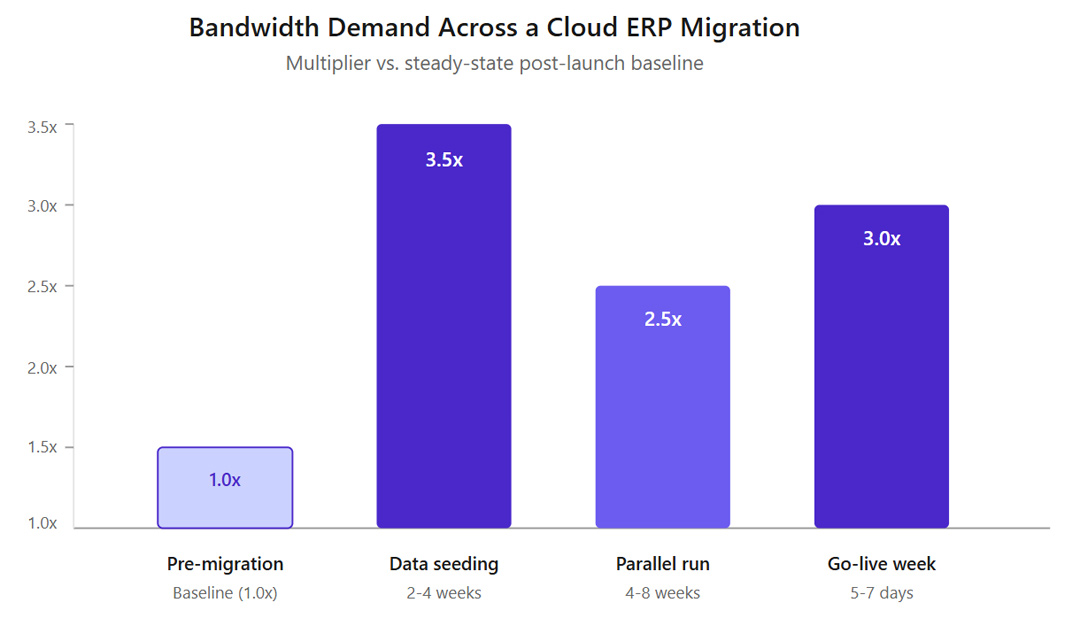
Initial data seeding. Moving historical data from the legacy system to the cloud ERP is a one-time, massive upload. Two to five years of transaction history, customer records, product catalogues, and financial data can run into hundreds of gigabytes. Seeding compresses into 2 to 4 weeks before cutover and pushes bandwidth to 3x or 3.5x the normal baseline.
Parallel run. For 4 to 8 weeks before cutover, the business runs the old system and the new system side by side. Both consume bandwidth. Integrations fire to both environments. Reports get pulled from both. Plan for sustained 2x to 2.5x normal bandwidth during this phase.
Go-live week. Everyone hits the new system at once, usually during the first working week after cutover weekend. Support calls spike, report generation spikes as users learn the new interface, integrations run their first real transactions. Week one bandwidth typically runs 2.5x to 3x baseline. Week two drops to 1.5x. By week four most deployments settle into the new normal.
Networks that cannot absorb these phases create exactly the problems that get blamed on "ERP issues" in post-project reviews.
Vertical realities: where bandwidth needs diverge
Three industry verticals drive most of MCK's Canadian mid-market cloud ERP conversations. Each has its own network shape.
Manufacturing
Manufacturing carries the highest ERP failure rate in the industry. Discrete manufacturing environments run heavy integration loads between the cloud ERP and on-premises shop floor systems like MES, WMS, and quality tracking. These integrations are typically real-time or near-real-time, generating steady API traffic that often exceeds the interactive user load. Plant networks also need to maintain operational technology separation for safety and compliance, which constrains how much can be routed through shared circuits. Sizing for manufacturing should assume 40 to 60 percent of total cloud ERP bandwidth goes to integration, not interactive users.
Professional services
Professional services firms, including accounting, legal, engineering, and consulting practices, run low transactional volume but heavy reporting and time-entry load. Bandwidth spikes align with billing cycles, quarter-end, and year-end. Multi-office Canadian firms with locations in Toronto, Montreal, Calgary, and Vancouver need to size each branch independently. Reporting queries pull from the central cloud instance regardless of which office the user sits in. A 4-office firm with 50 staff per office needs more total bandwidth than a single 200-person office, because each site has its own connection to the cloud provider.
Wholesale distribution
Wholesale distribution combines the worst of both worlds. Heavy EDI integration with trading partners, real-time warehouse management across multiple facilities, and batch overnight processes for order-to-cash reconciliation. Peak loads align with seasonal cycles: back-to-school, Black Friday, Boxing Week, and fiscal quarter-end. Canadian wholesale distributors operating in Ontario and Quebec also face cross-border EDI with US partners, adding latency-sensitive traffic to the mix. Sizing assumptions need to include both the interactive load and the scheduled batch windows.
When to upgrade the network, and when to wait
Not every cloud ERP migration needs a network upgrade. The table below maps current network state to a decision recommendation.
Canadian circuit lead times matter here. The CRTC's 2024 wholesale fibre access policy has expanded carrier options in Canadian business markets. Lead times for new business fibre still run 30 to 120 days depending on address serviceability. A circuit upgrade cannot happen mid-cutover. Decisions made less than 90 days before go-live usually result in LTE bonding or temporary capacity fixes that cost more and perform worse than a proper planned upgrade.
Bandwidth measurement should happen at least 60 days before cutover. Average utilization is not enough. Peak utilization during month-end, quarter-end, and backup windows is where the real constraints appear.
Internal IT, co-managed, or fully managed at migration time
Cloud ERP migrations in Canadian mid-market environments usually run 3 to 9 months. Internal IT teams almost always focus on the ERP side: vendor coordination, data migration, user training, configuration, and testing. The network side gets scoped out of the ERP project budget. Nobody owns it until it breaks on cutover weekend.
The most common pattern across successful migrations involves splitting responsibilities. Internal IT handles the ERP project. An external network partner handles bandwidth sizing, carrier procurement if an upgrade is required, redundancy design, and day-two monitoring. This splits the work by expertise and removes finger-pointing on launch weekend.
Co-managed arrangements work well for mid-market firms that want operational control but need external help for project delivery and after-hours coverage. Fully managed engagements make sense for firms that want a single vendor accountable for network uptime across the entire ERP lifecycle. MCK's managed network services for Canadian mid-market offices cover bandwidth assessment, circuit procurement, redundancy planning, and day-two monitoring across all three phases of a cloud ERP migration.
According to Mordor Intelligence's Canada digital transformation market analysis, hosted and cloud deployment accounted for 51.6 percent of Canadian digital transformation spend in 2024. The segment is growing at a 27.5 percent annual rate. The migration wave is already underway. The network readiness question will hit every mid-market Canadian firm over the next three years.
The network is the part of cloud ERP nobody plans for
Software vendors sell software. Integrators sell integration. Consultants sell methodology. The network gets assumed.
That assumption is where cloud ERP projects quietly fail. Not in vendor selection. Not in data migration. In the week after go-live when reports run slow and users start asking why the new system is worse than the old one.
Sustained-state bandwidth is the easy calculation. Migration-phase bandwidth is the one that breaks networks. Integration traffic is the one nobody measures in advance. Latency to the cloud data centre is the one nobody asks about until response time becomes a complaint.
A cloud ERP migration that runs on the wrong network costs more than an upgraded network would have. The upgrade gets planned once. The slow response times get debugged forever.
If the ERP project plan does not have a network workstream with its own owner, budget, and timeline, the project already has a problem it has not noticed yet.
Managed Networks
